
Download Jackson DJ – DJ app, music mixing tool, beat mapper, audio effects, live DJ software, music producer app
Overview
Jackson DJ is a specialized mobile application tailored for DJs seeking to craft professional-grade mixes using intuitive tools and real-time audio manipulation. Designed with both beginners and experienced users in mind, the app addresses the core challenges of beat alignment, seamless transitions, and creative sound experimentation. Its primary function is to assist in live and studio mixing by offering features such as beat structure analysis, dual-track visualization, and real-time effect control. The app serves as a digital DJ workstation, enabling users to manage two tracks simultaneously, a critical requirement for smooth transitions and dynamic performances. Target users include aspiring DJs, mobile music producers, and hobbyists interested in live audio mixing on smartphones or tablets.
The developer, Jackson DJ, has maintained a consistent presence in the mobile music space since the app’s release in 2007. Although no further details about the company or its history are available, the longevity of the application suggests a stable and reliable foundation. Jackson DJ operates as a utility tool within the broader music production ecosystem, filling a niche for lightweight, accessible DJ software on mobile platforms. Real-world use cases include on-the-go mixing, practice sessions, and live performances where portability and responsiveness are key. Its free availability enhances accessibility, making it a valuable entry point for users exploring digital DJing without the need for expensive hardware or desktop software.
Key Features & Functionality
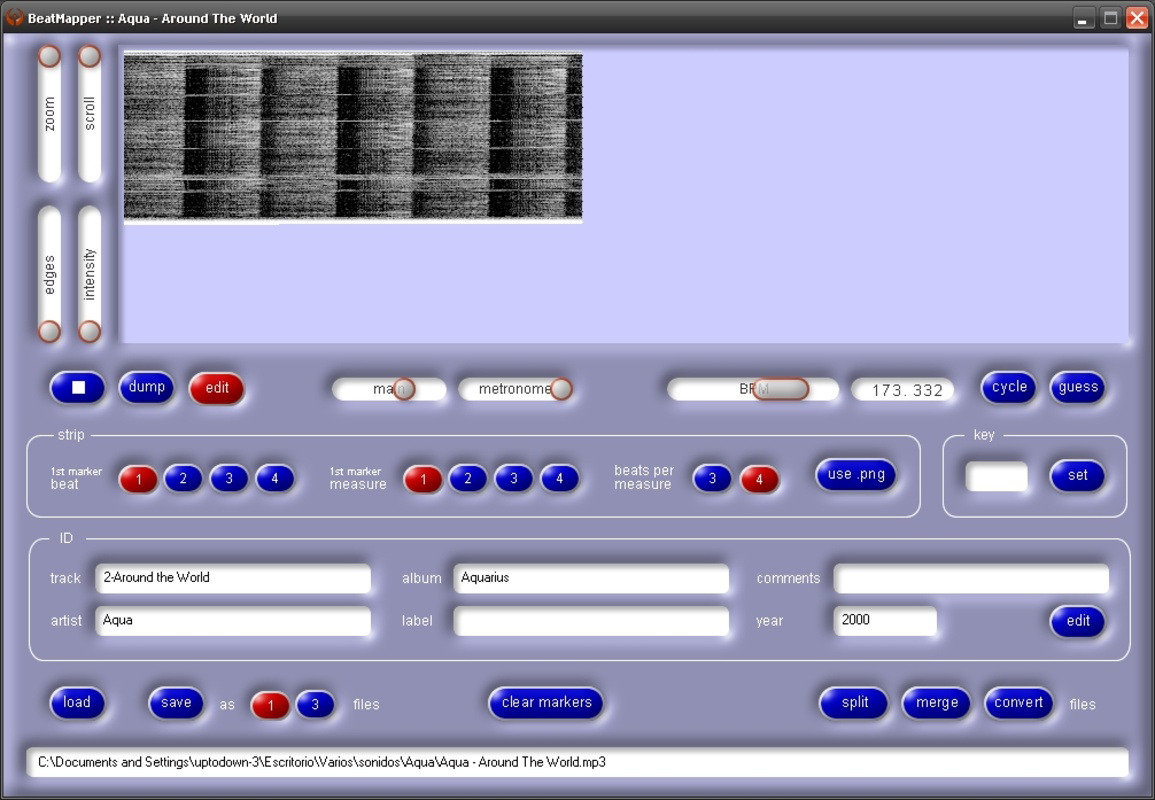
- Beat Mapper Feature: This core functionality analyzes the rhythmic structure of uploaded tracks, identifying individual beats and providing a visual representation. This allows DJs to align songs precisely, ensuring that tempo and phase match across tracks, which is essential for professional-sounding mixes.
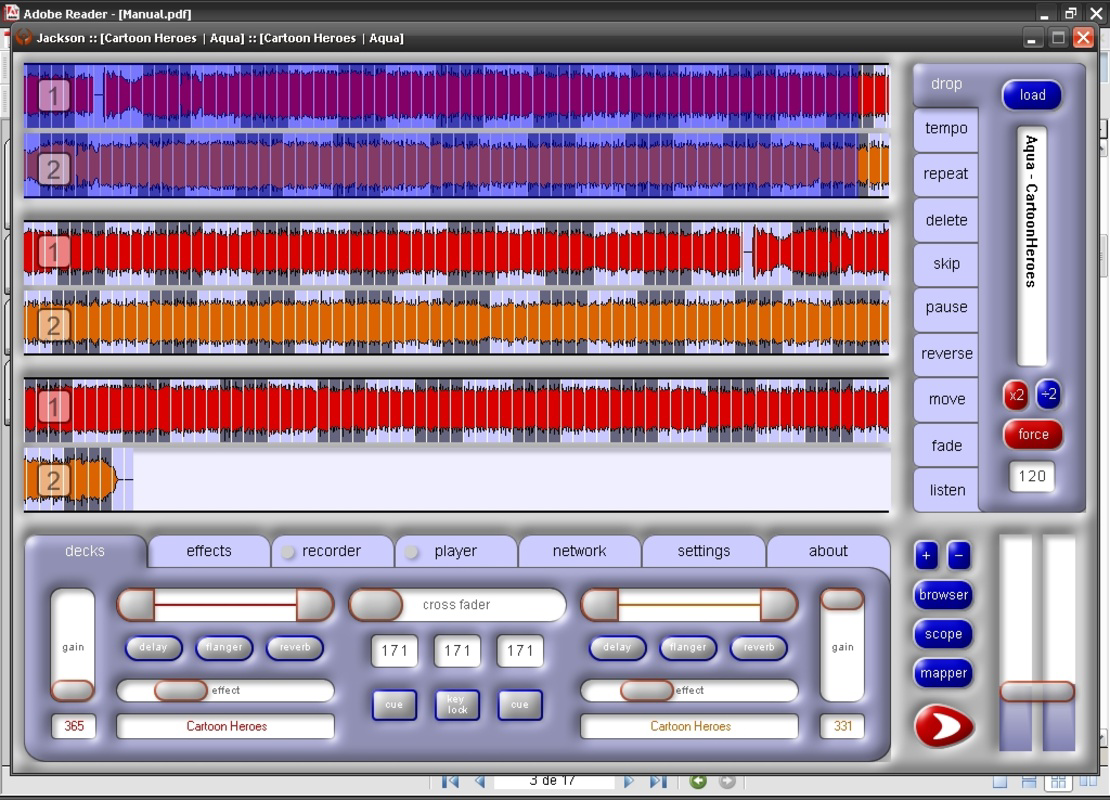
- Dual Track Display: The interface presents two tracks side-by-side, enabling users to monitor both songs in real time. This layout enhances situational awareness during mixing, allowing for precise timing adjustments and visual feedback on cue points and beat alignment.
- Effect Control Panels: Located at the bottom of the screen, these panels offer real-time access to a range of audio effects such as reverb, delay, and filters. Users can apply and modulate these effects during playback, adding depth and creativity to their mixes.
- User-Friendly Cross Fader: A central control element, the cross fader allows smooth blending between tracks. It supports gradual transitions, enabling one track to fade out while another fades in, a fundamental technique in DJing that ensures continuity and flow.
- Helpful Documentation for Newcomers: Recognizing the learning curve associated with DJ software, Jackson DJ includes built-in guides and tutorials. These resources provide step-by-step instructions on using key features, helping new users understand beat mapping, transition techniques, and effect application.
For example, a beginner can use the beat mapper to align a slow-tempo track with a faster one, then use the dual display to time the cross fader for a seamless blend. The effect panels allow experimentation with ambient textures during transitions, adding a unique sonic character. This combination of tools makes the app suitable for both practice and performance scenarios.
Interface, UX & Performance
The user interface of Jackson DJ is designed with clarity and functionality in mind. It features a clean layout that divides the screen into two primary sections for the two tracks, with control panels concentrated at the bottom. The visual style is minimalistic, focusing on essential elements like waveform displays, beat markers, and effect indicators. Navigation is straightforward, relying on touch-based controls for track selection, cross fader movement, and effect activation.
While the developer did not provide detailed performance metrics, the app’s lightweight file size of 4.8 MB suggests optimized resource usage. This makes it suitable for a wide range of Android devices, including older models. The app’s responsiveness appears to be adequate for real-time mixing, though performance may vary depending on device hardware and background processes. Stability is implied by the app’s long-standing presence in the market, indicating consistent functionality over time. However, no specific information was provided regarding crash rates, lag, or battery impact.
Platform Compatibility & Technical Requirements
Jackson DJ is available exclusively on the Android platform. The app’s current version is 2.0, released on June 22, 2007. It has a file size of 4.8 MB, making it highly portable and easy to install on devices with limited storage. The developer did not specify minimum OS requirements, nor did they list compatibility with specific Android versions or device types. As such, users should exercise caution when installing on newer devices, as compatibility with modern Android versions cannot be confirmed without further information. The app’s age raises potential concerns about security updates and support, especially given the lack of recent updates.
Pros and Cons
- Free to download and use, reducing entry barriers for new DJs
- Lightweight file size (4.8 MB) ensures fast installation and minimal storage usage
- Dual-track display enhances visual control during mixing
- Beat mapper aids in precise track alignment and professional transitions
- Comprehensive documentation supports beginner learning and onboarding
- Real-time effect controls encourage creative experimentation
- Version 2.0 released in 2007—no recent updates or modern feature enhancements
- Compatibility with current Android versions not confirmed
- Developer did not provide technical specifications or performance benchmarks
- May lack support for modern audio formats or high-resolution audio
- Interface may appear outdated compared to current DJ apps
FAQ
Is Jackson DJ safe to download and install?
Yes, the app is free and available through official Android channels. However, due to its age and lack of recent updates, users should ensure they are downloading from a trusted source to avoid potential security risks.
Can I use Jackson DJ on iOS devices?
Currently, the app is only available on Android. No information is available regarding iOS compatibility or future development plans.
Does Jackson DJ require internet access?
Based on available information, the app functions offline. It does not appear to require an internet connection for core mixing features, making it suitable for live performances without connectivity.
What file formats does Jackson DJ support?
The developer did not specify supported audio formats. Users may need to test compatibility with common formats like MP3, WAV, or AAC.
How often is Jackson DJ updated?
The last known version was released in 2007. There is no indication of recent updates, suggesting the app may not receive ongoing maintenance or feature improvements.
Final Thoughts
Jackson DJ remains a notable presence in the mobile DJ software landscape, particularly for users seeking a lightweight, free tool for music mixing. Its core features—beat mapping, dual-track display, and real-time effect control—provide a solid foundation for both learning and practical use. While the app’s age is evident in its interface and lack of modern updates, its continued availability speaks to its enduring utility. For beginners exploring DJing, the built-in documentation and intuitive layout offer a gentle learning curve. However, users should be cautious about compatibility with current devices and the absence of ongoing support. Despite these limitations, Jackson DJ delivers a functional experience for basic mixing tasks.
For those looking to experiment with music production and live mixing on a budget, this app offers a unique historical and practical value. Download Jackson DJ now to experience a long-standing tool in the world of mobile DJing.


